Blog
Giving yourself superpowers: Advice on building a simple company brain
By Henry Dowling ·
If you do skilled knowledge work at a company (for example, you’re the CPO of a startup, or you’re leading AI transformation at a consulting company), it’s a really good idea to build a company brain.
In this article, I’ll give my opinionated take on the correct way to build a company brain so that you can leverage yours as effectively as possible.
What problem does a company brain solve anyway?
Company brains exist because recently, smart knowledge workers (e.g. consultants, investment bankers, product managers) have started using AI agents (e.g. Claude Code) to do general knowledge work besides coding. This means making excel sheets and powerpoints, writing audit reports, etc.
There’s a problem that you run into whenever you try to use AI agents for knowledge work: they need a lot of context on stuff going on in your organization. For example, they need access to your email, Slack/Microsoft Teams, Jira, SharePoint, etc.
A company brain solves this problem: it helps your agents find the information they need in order to do knowledge work tasks. E.g. if you need revenue numbers from a sheet in Google Sheets and details about a customer from Gong in order to make a sales deck, a company brain allows your agent to seamlessly find this info.
Modern company brains also include additional affordances including memory (i.e. summarization of learnings from agent trajectories in the company) and tracking of agent usage (i.e. sharing agent transcripts).
How are you supposed to use a company brain?
The way that I like to think about it is that if you are doing a company brain “right”, you are giving yourself a bunch of superpowers as an IC. This is especially important now given the trend that “everyone is an IC”, even (especially) execs.
As you use your company brain more, you’ll learn what use cases are most useful to you, but in order to get started and get an idea of what some “superpowers” can look like, I’ll list some examples below.
- Support your roadmap decisions with exact numbers from sales calls. Check in on Gong sales calls to see how many mentions of upcoming candidate projects for your roadmap there are.
- Be insanely well-prepared for meeting with your direct reports. Prepare for a 1:1 with a direct report by asking for a rundown of every public artifact that your direct report has created—this includes Slack messages, meeting transcripts that you have access to, etc.
- Be the best user of AI in your organization. Audit all of your past conversations with your AI agent to learn what you could be doing better (this is the general idea of recursive self-improvement in the context of a company—use AI to help you improve your organization more efficiently with AI).

One example of a guy using a company brain
How to actually build a company brain
Now that I’ve given some motivation for why you should probably build a company brain, I will give a bunch of advice on how to actually do it.
Authentication: build a central control plane to handle different varieties of integration
A good company brain connects your AI agents to dozens of integrations. Most company brains today grow organically, one integration at a time, and thus have poor abstractions for handling large numbers of integrations. For example, hardcoding client_ids for integrations in environment variables is fine until you have 50 of them. This gets even more complicated when you start to incorporate integrations with different auth strategies; for example, MCP integrations such as Granola commonly use Dynamic Client Registration, in which a client needs to be programmatically created at connection time per-user and therefore can’t reliably be stored in an environment variable at all!
Create a central DB table for company brain integrations once you start building (or at least migrate over to using them once you’re ready). Store client_id, bearer auth token, and refresh token. This will cover all three common auth strategies—OAuth, API token, and DCR—so you won’t have to continually rebuild your authentication infra as you add on more and more integrations. Encrypt these fields in this DB at rest unless you want your CISO to get mad at you.
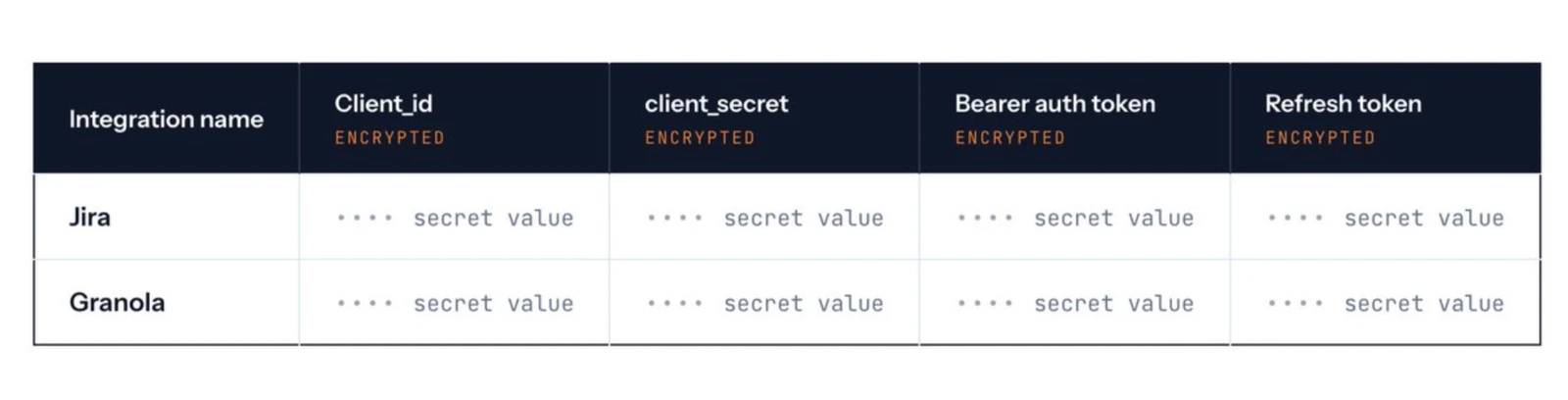
Example of what your integrations table might look like
Give your AI great retrieval and memory
These integrations are only useful if your agent is able to easily find the information inside them. We do two things in order to make it easy for agents to find information in company resources: (1) we regularly sync the information from integrations to your own database so that we aren’t bottlenecked on API rate limits for querying, and (2) we build sleep-time compute indexes on top of the data in order to facilitate faster and more relevant AI retrieval. I’ll talk about both of these systems in a bit more detail below.
Syncing information
We use Celery to sync all integrations every hour. We’ll also manually re-sync integrations whenever an AI agent writes a query that needs up-to-date information from a given source. There are some sources, like Slack and GitHub, which thankfully have great webhooks, so we can keep our synced data completely real-time up-to-date.
Build indexes on top of information
There was this great paper that Letta put out last year that showed the usefulness of asking LLMs to precompute answers to questions that they anticipate the user will ask[1]. We adapt this technique to improve the quality of information that AI agents are able to get out of our company brain.
A great canonical spec of this is Andrej Karpathy’s LLM wiki. The essential idea is that you write a bunch of markdown documents summarizing the contents of the resources in your company brain. Be advised, though, that if you follow this implementation exactly, the LLM wiki will probably become “slopified” over time, as continual AI rewriting of a knowledge base causes it to lose information.
We use a number of techniques to mitigate this such as periodic regeneration from source and citation requirements.
However, in general this is an open problem. We’re releasing a benchmark in the coming weeks to encourage creative solutions to the “wiki slopification” problem from the community.
If you’re curious, I write about our indexing strategy in much more detail here.
Store HTML data that your agents create
AI agents can give you much more expressive responses when they respond to your questions with an HTML document rather than a plain text response. Here’s a good article explaining the many reasons why. Below is a screenshot of such a document:
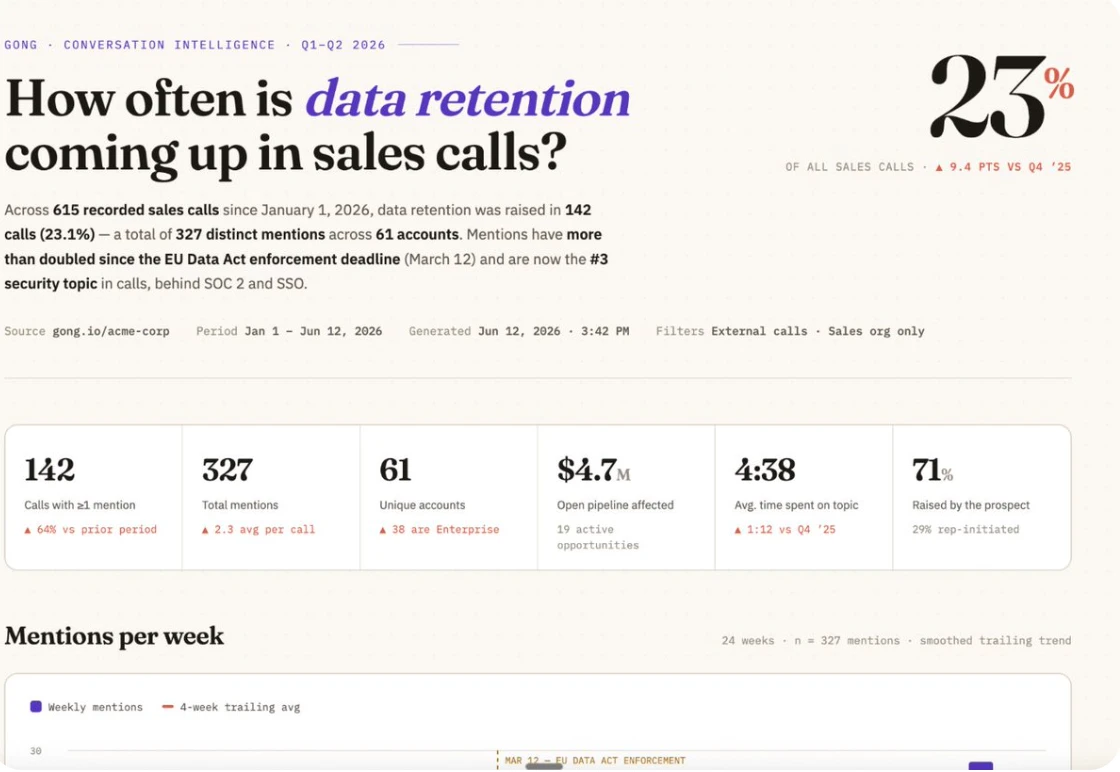
In most company brain setups, after an agent creates one of these HTML documents, it is promptly thrown away. We think you should store these documents in your company brain, since they typically provide useful analysis on questions that are important to your business. We built a Claude Code plugin that automatically uploads these artifacts to the company brain after every conversation.
Upload your session transcripts
Similarly, perhaps more importantly, you should upload agent session transcripts to your company brain! AI agent transcripts are a gold mine of learnings, decisions, and synthesis, and they will only increase in their information contents as agents become capable of running on increasingly long time horizons. I’ve written about the importance of doing this previously—we found that giving agents access to their past session transcripts can reduce the amount of time they waste on coding tasks by nearly half!
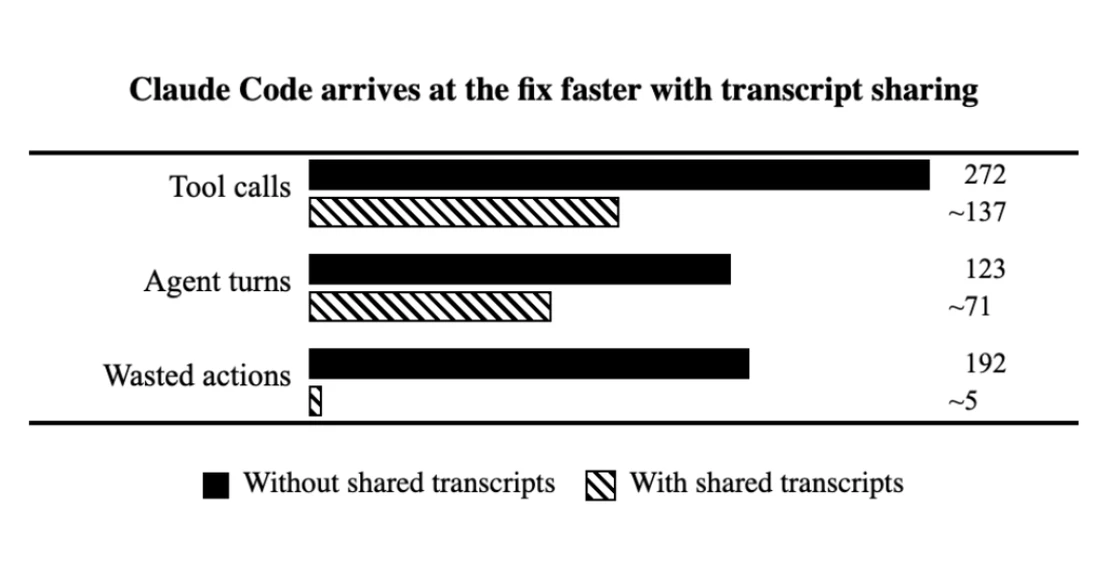
Coding agents write higher quality code faster when they’re able to read past transcripts. So you should make them accessible via your company brain!
You can store session transcripts in a table, where each line from the .jsonl session transcript is a row.
User-scope data that you connect
One barrier to building a good company brain is that making it multiplayer requires careful consideration of privacy. You want everyone’s agents to be able to benefit from a company brain, but you don’t want anyone’s agents to access any resources that they don’t have access to.
The simplest and most straightforward way to solve this is to simply user-scope all integrations—everyone in your organization has to individually connect all their company resources to the company brain. The general principle should be that each person’s AI agent is only able to see the resources that they have direct OAuth access to view.
This allows you to take advantage of the existing privacy controls built into your company resources rather than trying to re-invent access policies from scratch. I’d recommend against re-inventing them, since it’s pretty costly if you get it wrong (what if someone finds out they’re getting fired because their AI agent mistakenly had access to a sensitive meeting transcript?).
Okay, now go build it!
What I wrote above is the SOTA for building a company brain in June 2026. If you do these things, then you will be ahead of 95% of your competitors in terms of the AI adoption of your company, and you will find that you’re able to get much higher quality work done, much faster than before. Happy building!
Also, if you’re interested in trying a service that provides the above for you out of the box, I’d suggest you take a look at Stash! We’re fully open-source and our customers trust us to handle the annoying parts of getting their company brain up and running so they can skip right to the incredible benefits that they provide.
- This is basically the LLM version of caching; instead of deterministically precomputing and storing answers to compute-heavy questions, we just nondeterministically write up a summary distilling an answer to a question that we expect the user to likely ask.